
Account access
One panel, one password, one button. If it is not letting you in, the answer is almost always in the first three checks below rather than in your account.
- Your Pack Name or the registered email — both work in the first field
- The eye icon reveals what you typed before you submit
- Reset links are single-use and time-limited
Wolf Winner Login: Get Back Into Your Account in Under a Minute
Most sign-in problems have a two-step fix, and almost none mean anything is wrong with your account. This page starts with the normal procedure, then splits the common failures into sections you can jump to: wrong credentials, a forgotten password, a missing reset email, a locked account, and being logged out on your own.
The Normal Sign-In, Step by Step
- Open the site and select LOGIN in the left-hand menu, directly under the SIGN UP button.
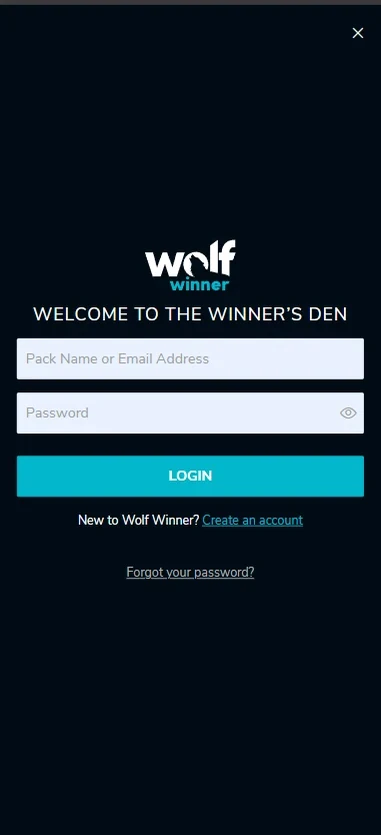
- The panel that opens is headed "Welcome to the Winner's Den".
- In the first field, enter either your Pack Name (the username you chose at registration) or the email address on the account. Both work.
- Type your password. The eye icon at the right of the field reveals what you have typed, which is the fastest way to catch a typo before you submit.
- Select LOGIN.
A successful Wolf Winner login drops you straight into the lobby with your balance visible in the header. Nothing else needs confirming, and no email arrives to approve the session unless you are signing in from a device the account has not seen before.
If you have never registered, the same panel carries a "Create an account" link. Registration asks for an email address, a username, a password and a mobile number with the Australian country code, and the account exists from that point on.
After sign-in





Signing In From a Phone
Wolf Winner login works the same way in a mobile browser as it does on a desktop. Whether you use an Android handset or an iPhone, the browser loads the full site, and the panel is identical: one field for your Pack Name or email, one for the password, one button.
The mobile version is not a cut-down build. Once you are in, the pokies lobby, the search box, the category filter, the cashier and account settings are all reachable, and games load in the browser without anything to install. Saved to a home screen, the site becomes an icon you tap once instead of typing an address, which removes one step from every return visit.
Two mobile-specific habits save time. Keyboards on phones capitalise the first character by default, which breaks case-sensitive passwords, so check the first letter before submitting. And if you use a password manager, let it fill the field rather than retyping, since the most common mobile failure is a mistyped character on a small keyboard rather than a genuine credential problem.
Mobile
The full site loads in Chrome on Android and Safari on iPhone. Saved to a home screen, it becomes an icon you tap once instead of typing an address.
Find Your Problem
| What you are seeing | Most likely cause | Where to go |
|---|---|---|
| "Incorrect email or password" | Typo, caps lock, or the wrong email address | The next section |
| No idea what the password is | Forgotten credentials | Resetting your password |
| Reset email has not arrived | Spam filtering or a different registered address | When the reset email does not arrive |
| "Account locked" or repeated rejections | Security lock after failed attempts, or a pending check | Locked accounts |
| Signed out on your own | Session timeout or a device change | Unexpected logouts |
"Incorrect Email or Password"
This message means the combination submitted did not match, and it does not tell you which half was wrong. That is deliberate, because naming which field failed would tell an attacker whether an account exists on a given email.
Work through these in order, since the first three resolve most cases in seconds.
- Check caps lock and the keyboard language. Passwords are case-sensitive. A single capital where you meant lowercase produces exactly this error.
- Reveal the password. Select the eye icon and read what is actually in the field. Trailing spaces from a copy-paste are invisible and are a frequent culprit.
- Try the other identifier. If the email is not being accepted, enter your Pack Name instead, or the reverse. Players who registered a while ago often remember one and not the other.
- Check which email you registered with. A second personal address, a work address, or a partner's address used on a shared device all produce this error even with the correct password.
- Clear a stale autofill entry. If your browser is filling the fields from an old saved entry, delete the saved credential and type it manually. Autofill that predates a password change will fail every time and keep failing silently.
If you get through all five and the message persists, stop guessing. Repeated failed attempts trigger a temporary security lock, so reset the password rather than trying a sixth variation.
Resetting a Forgotten Password
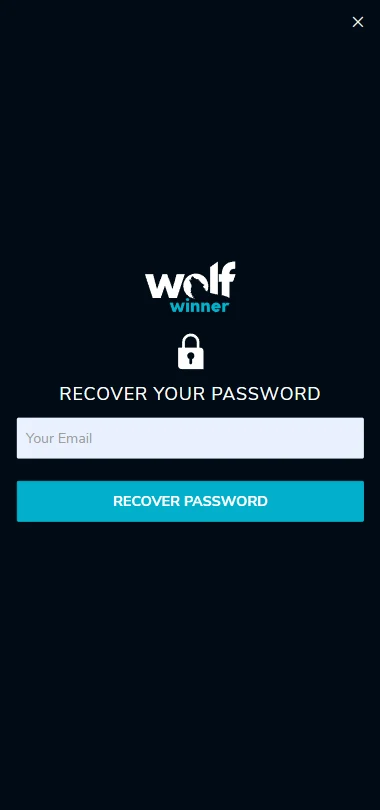
- Select Forgot your password? at the bottom of the sign-in panel.
- Enter the email address registered to the account. This has to be the registered address; a different one produces no email at all.
- Submit the form and close the tab if you like. The reset link works from any device.
- Open the message and follow the link, which takes you to a page where you set a new password.
- Choose a password you do not use anywhere else, and make it long rather than complicated. Length beats symbol substitution.
- Sign in with the new password. The old one stops working immediately, including on any other device where it was saved.
Reset links are single-use and time-limited. If you return to one hours later and it fails, request another; that is normal, not a fault.
Password reset
- Use the registered address. A different one produces no email at all, not an error message.
- Open the link once. Reset links are single-use and time-limited; an old one failing is normal.
- Request one more, not five. Each new request invalidates the previous link, so only the last one works.
The new password takes effect immediately and signs out every other device where the old one was saved.
Reset your passwordWhen the Reset Email Does Not Arrive
Delivery is usually a matter of a couple of minutes. Give it fifteen before deciding something has gone wrong, because greylisting at the receiving mail server can hold a first-time message for roughly that long.
After fifteen minutes, check in this order:
- The spam and promotions folders. Gmail routes many automated messages to Promotions rather than the inbox, and Outlook drops unfamiliar senders into Junk.
- The address you actually typed. A single transposed character sends the message nowhere.
- Whether you have a second email account. Search all of your inboxes for the brand name rather than checking one.
- Filters and rules. An old filter that files or deletes messages containing "casino" will quietly swallow the reset.
Request one more reset, not five. Each new request invalidates the previous link, so a queue of requests means only the last one works and the others fail confusingly. If nothing has arrived after a second attempt and a genuine check of spam, that points to a mismatch between the address you are using and the address on the account, which is something only support can resolve.
Locked Accounts
A lock is a routine security measure with a defined way out, not a penalty and not a sign that your money is at risk.
Accounts commonly lock for three reasons:
- Too many failed sign-in attempts in a short window. This is the automatic one, and it protects the account against someone working through a password list. These locks lift on their own after a cooling period, and resetting the password clears the state immediately.
- A pending verification step. If identity documents have been requested and not yet supplied, or a submitted document was unreadable, access to some functions can be restricted until the check completes. Uploading a clear, in-date document resolves it.
- A security flag on unusual activity. A sign-in from an unfamiliar country, or an abrupt change of device and payment behaviour, can pause an account while it is reviewed. That review is a human process.
The first two you can usually clear yourself. The third needs support, and the fastest route is live chat inside the account. Have your registered email and Pack Name ready, be straightforward about what you were doing when access stopped, and expect to confirm your identity as part of the conversation. Support cannot tell you your password, because passwords are stored in hashed form and nobody at the casino can read them.
Still locked out
Failed attempts lift after a cooling period, and resetting the password clears the state immediately. Your balance is not affected while an account is locked.
Logged Out Without Warning
Being signed out on your own is almost always the system doing its job.
Session timeout. A session that has been idle expires and needs a fresh sign-in. On a shared or public computer this is the single most valuable security behaviour there is.
A new device, browser or network. Sessions are tied to the browser they started in. Switching from mobile data to Wi-Fi, opening a private window, or picking up a different phone all count as a new session.
Cleared cookies or a browser update. The session identifier lives in a cookie. Clearing site data, running a cleaner, or letting a browser update wipe storage ends the session instantly.
A password change. Changing the password signs out every other active session by design, including the one on your other device.
Restrictive privacy settings. Blocking all cookies, including strictly necessary ones, makes it impossible to hold a session at all, so you will appear to be logged out the moment you navigate to a second page. Allowing cookies for the site fixes it.
If you are being logged out every few minutes on the same device with normal settings, that is worth raising with support. A single unexpected logout is not.
Fresh session
Allowing cookies for the site and keeping one tab open removes the most common cause of repeated logouts on a phone.
What Makes the Sign-In Secure
Wolf Winner account access rests on a handful of unglamorous mechanisms that work when you let them.
The connection is encrypted end to end, so credentials submitted on the login panel are not readable in transit; check that the address bar shows https and the correct domain before typing anything. Passwords are stored hashed rather than in plain text, which is why a reset exists but a password lookup does not. Repeated failure triggers the lock described above. Identity verification before a first withdrawal means money cannot be moved out of your account by someone who has only your password.
Your side of it is simpler. Use a password unique to this account, so a leak elsewhere cannot be replayed here. Do not sign in over public Wi-Fi you do not control if you can avoid it. On a machine other people use, end the session deliberately instead of just closing the window. And treat any message asking you to "confirm your Wolf Winner sign in" through a link with suspicion: check the domain in the address bar rather than trusting the text of an email.
FAQ
How do I reset my Wolf Winner password?
Select "Forgot your password?" on the sign-in panel, enter the email address registered to the account, then open the message and follow the link to set a new password. The link is single-use, and the previous password stops working as soon as the new one is saved, including on devices where it was remembered.
Why does Wolf Winner say my email or password is incorrect when I know it is right?
The most frequent causes are caps lock, an invisible trailing space from a paste, browser autofill holding an outdated password, and registering originally with a different email address. Use the eye icon to read what is in the password field, try your Pack Name instead of the email, and remove any saved credential before retyping manually.
How long should the password reset email take?
Normally a couple of minutes. Allow fifteen before treating it as a failure, then check spam and promotions folders and confirm the address you entered. Request one further reset at most, since each new request cancels the previous link.
My account is locked. What do I do?
If it locked after several failed attempts, wait for the cooling period or reset your password, which clears the lock straight away. If it locked because verification documents are outstanding, upload a clear photo of a current ID. Anything else, contact support through live chat in your account with your registered email to hand. Your balance is not affected while an account is locked.
Why do I keep getting logged out on my phone?
Usually a privacy setting rather than an account fault, and the same applies whichever device you use Wolf Winner sign in on. Blocking cookies or running a cleaner on the browser removes the session identifier, and switching between mobile data and Wi-Fi can end a session mid-use. Allow cookies for the site, keep the tab open rather than reopening it repeatedly, and add the site to your home screen for a consistent browser context.
Is the Wolf Winner login page secure?
The panel submits over an encrypted connection, passwords are stored as hashes rather than readable text, repeated failed attempts lock the account automatically, and identity checks stand between anyone else and your balance. The part that depends on you is a password used nowhere else, and a glance at the domain in the address bar before you type it.
A successful sign-in drops you straight into the lobby with your balance visible in the header. No account yet? The same panel carries the registration link.
- Pack Name or registered email — both work
- First deposit matched 125% up to $2,000
- 125 free spins on that first deposit